1. Screen size
The Reading Matrix gives the maximum distance from presenter to lens. Some presenters prefer larger screens for eyesight reasons.

Ten things to consider, from screen size and brightness to software and the presenter.
Match the monitor to where you are shooting.
| Where | Brightness |
|---|---|
| Indoors | About 350 to 500 nits (most tablets reach this) |
| Outdoors, bright sun | 1200 to 1500 nits (the Quasar range) |
The Reading Matrix gives the maximum distance from presenter to lens. Some presenters prefer larger screens for eyesight reasons.
About 350 to 500 nits indoors, 1200 to 1500 nits outdoors in bright sun.
PC software such as WinDigi suits multi-camera and newsroom work. Tablets are cheaper and good for handheld wireless use but limited in script connections and editing.
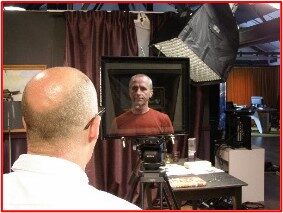
Lets an interviewee look at the interviewer rather than the lens. Passive (reflector hood) and active (second camera feed) variants.
Mounting the prompter above or below the lens suits jibs, cranes, drones and green screen work, and is largely invisible on mid or wide shots.
Mounted beneath the main prompter to show position in a virtual studio or the programme output. Clocks can be added.
Folding hoods keep weight down so large screens such as 24" or 32" don't upset camera balance or mobility.
Specialised mounting plates allow prompters on PTZ cameras. Dome cameras are harder to rig.
Consider hand or foot controllers or a PC mouse, plus the signal type: VGA, HDMI, SDI, composite or NDI.
Practice, natural delivery and bullet points help if scripted reading isn't the presenter's strength.
The interrotron was developed in the 1980s by US film director Errol Morris.
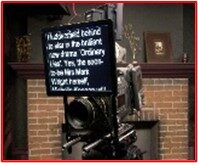
Tablets are cheaper and good for handheld wireless use, but limited in script connections and editing, and scrolling must follow the presenter rather than run at a fixed speed. PC software such as WinDigi suits multi-camera and newsroom work.
It lets an interviewee look at the interviewer rather than the lens.
Lightweight folding hoods keep weight down so 24" or 32" screens do not upset balance or mobility.
Describe the job to the team: +44 (0)1494 450414.